

From Camera to SCADA Alarm:Securing Video Analytics in OT
Move the event, not the video. Two reference architectures for camera analytics, MQTT event bridging and controlled remote viewing across the industrial OT boundary.
Reference architectures and control mappings are design guidance, not certification, a completed customer deployment, or a report of measured results. They do not replace a site-specific safety and security assessment. The document date above is not a website publication date.
The practical answer
Keep viewing controlled. Bridge only event flags.
Use a broker in the L3.5 industrial DMZ, with the L3 broker initiating the connection outward on TLS port 8883. Scope one-way event topics with certificate-based ACLs and mTLS. Put remote viewers behind an MFA-protected proxy or view-only relay, not a camera port forward. Camera analytics raise SCADA alarms; they do not drive control actions.
From camera to SCADA alarm
Cameras used to be a physical security purchase. Facilities bought them, IT handed out an IP range, and operations didn't think much about them. That's no longer true. On a modern midstream site the camera is running analytics: perimeter intrusion, a person in a restricted zone near a compressor, smoke or flame, a thief hatch left open on a tank. The control room cares about those events, and operators want them on the same screen as their pressures and flows.
That puts two security problems on the table at once. First, nearly every camera and NVR ships expecting to be viewed over HTTPS on port 443, and remote viewing is usually the first feature anyone asks for. Second, the moment an analytics flag has to reach SCADA, you've built a path between a device class with a rough security track record and the systems that run the process.
This article works through both problems using two reference scenarios built on the ISA-95 / Purdue levels. In the first, the cameras land in L4 on the business side. In the second, the cameras are split across L3 and L4, and both zones do their own monitoring. Either way, camera flags travel as MQTT through a broker in the L3.5 DMZ. The broker is replicated so that nobody ever has to open an inbound connection into the control zone.
The Port 443 problem
Port 443 is the default door for remote camera viewing, and treating it as safe because it's encrypted is the most common mistake I see. The camera's web UI, the NVR's web client, the VMS mobile app and almost every cloud managed camera all ride on HTTPS. When a field supervisor asks to see the gate camera from their phone, the fastest answer an integrator has is a port forward of 443 to the NVR. Plenty of sites are still running exactly that.
The scale shows up in the research. In 2022, CYFIRMA analyzed about 285,000 internet-facing Hikvision web servers and found roughly 80,000 still vulnerable to CVE-2021-36260. That's an unauthenticated command injection in the camera's own web server, and it sits on CISA's Known Exploited Vulnerabilities list. Every one of those devices was reachable on the same web port an operator uses to watch video. [1, 3]
Encryption on 443 protects the session. It does nothing to authorize who is on the other end, and it blinds your IDS to what is inside. There are three ways 443 shows up on a camera system, and they carry very different risk:
Swipe or scroll horizontally to read all columns.
| Access pattern | How it works | Risk |
|---|---|---|
| Inbound port forward | Firewall NATs 443 from the internet straight to the camera or NVR | Highest. The device's web server is the attack surface, and it is rarely patched on an OT schedule |
| Outbound cloud tunnel | Camera or gateway holds a persistent outbound 443 session to the vendor cloud | Moderate. No inbound hole, but the vendor's admin plane now reaches your devices |
| Brokered remote access | Users authenticate to a DMZ gateway or VMS proxy with MFA; only the proxy talks to cameras | Lowest, when the proxy is the only path and is logged |
The cloud row deserves a hard look because it feels safe. In March 2021, attackers got into a Verkada support server and used a super admin credential to reach live feeds from roughly 150,000 cameras, including hospitals, prisons and a Tesla facility. The customers never opened a port. The outbound 443 tunnel was the path in. [2]
For OT sites, the hardening list for 443 looks like this:
- No inbound NAT to any camera, NVR or VMS server. Remote viewers go through a DMZ proxy or a ZTNA broker with MFA.
- Cameras on their own VLAN and IEC 62443 zone, with a conduit policy that only allows the VMS or recorder to talk to them.
- Cloud managed cameras get an explicit egress allowlist to the vendor's FQDNs. Nothing else leaves that VLAN on 443.
- IDS/IPS coverage on every 443 path, with alerts and a standing report. The firewall rule is where this starts, not where it ends (see below).
- Replace self-signed certificates, kill default credentials, disable HTTP (80), UPnP and unused vendor ports such as 8000.
- Firmware patching on a published cadence, tracked against the CISA KEV list.
Beyond 443: the VMS port map
443 gets the focus here for a reason. It's one of the most common ports crossing between IT and OT, and it carries far more than video: web consoles, cloud management, vendor APIs and remote support tools all ride it. In video systems specifically, though, 443 is only part of the picture. A VMS client usually talks to the VMS servers over the vendor's own ports, and those servers talk to the cameras. Genetec Security Center is a good example. Its Directory runs on TCP 5500, video requests go over RTSP on 554, and live video moves across large UDP port ranges. Those wide UDP ranges are where firewall rules tend to get sloppy, because it's easier to open the whole range everywhere than to scope it to the hosts that need it. Milestone, Avigilon, Hanwha and others each have their own lists. The rules from this article still apply: get the vendor's port map, allow only what the design needs between zones, and build your IDS baseline around it. Any VMS port showing up on a boundary it shouldn't cross deserves the same alert as an unexpected 443 session.
Opening 443 means owning what crosses it
A firewall rule answers one question: is this source allowed to reach this destination on this port? It can't tell you whether the session on 443 is a guard checking the gate camera, an exploit aimed at the camera's web server, or a command and control channel dressed up as HTTPS. Once 443 is open, the job shifts from permitting traffic to proving it. You have to see what's crossing, compare it to what you expect, and report on the difference.
The good news is that camera systems are boring on the wire. A camera talks to a handful of known hosts, streams at a predictable bitrate, and presents the same certificate and TLS fingerprint every day. That makes a tight baseline possible, and it makes anything off that baseline worth an alert.
Where the sensors go. Each 443 path needs its own coverage, and the right mode depends on what sits behind it.
- At the remote access proxy (L4 or DMZ), inline IPS with decryption. You terminate TLS here anyway, so inspect the HTTP inside it. Allow only the live view and playback endpoints for remote users. Block admin, user management and firmware upload paths from anywhere outside the camera zone. Run signatures for known camera CVEs. A false positive here blocks a viewer, not a process, so blocking mode is acceptable.
- On the camera VLAN egress, passive IDS on a SPAN or tap. Cloud managed cameras usually pin their certificates, so you won't decrypt them. Watch the metadata instead: SNI, certificate issuer, JA3/JA4 fingerprint, destination, bytes and timing.
- On the conduits into and out of L3, a passive OT network monitor. Never inline next to the control network. A sensor that fails closed or drops a packet it misreads should never be able to interrupt the process. In Scenario 2, this sensor also watches the L3 camera zone for a camera reaching for anything other than the NVR and the broker.
What to alert on. When you can't read the payload, the metadata still tells you a lot:
Swipe or scroll horizontally to read all columns.
| Signal | Normal for a camera system | Alert when |
|---|---|---|
| Destination / SNI | The VMS proxy and the vendor's published cloud FQDNs | Any new domain, or a bare IP with no SNI |
| TLS fingerprint (JA3/JA4) | One or two client fingerprints per camera model | A new fingerprint from a camera, which usually means new software on the device |
| Certificate | Known issuer, stable serial, valid dates | Certificate swap, self-signed cert appears, expired cert accepted |
| Volume and direction | Steady upstream bitrate per stream; viewers pull down | Upload spikes, sessions at odd hours, long-lived sessions to new destinations |
| HTTP paths (at the proxy) | Live view and playback | Config, account changes or firmware upload from a remote session |
| Session origin | Users through MFA to the proxy; cameras only to the NVR and broker | A camera opening sessions to other internal hosts |
Reporting, not just alerting. Alerts catch the loud events. Reports catch drift. Send IDS/IPS alerts, TLS metadata and proxy logs to the SOC with OT context attached, so an analyst knows a camera VLAN alert isn't an office laptop. Then publish a standing 443 report, weekly at minimum, covering who viewed which cameras from where, new destinations and fingerprints, certificate changes, blocked requests and signature hits. Someone in operations should sign off on it. That's what IEC 62443-3-3 SR 6.1 (audit log accessibility) and SR 6.2 (continuous monitoring) look like in practice, and it's the evidence an auditor will ask for.
If nobody reads the report, the port is open and unwatched. That's the same as a port forward with extra steps.
MQTT as the event bridge
SCADA doesn't need video. It needs a flag. "Person detected, Zone 3, Compressor Building B, 14:02:17" is a few hundred bytes, and it's exactly what MQTT was built to move. Most current VMS platforms and many edge analytics cameras can publish events to an MQTT broker natively. On the SCADA side, platforms like Ignition consume MQTT directly, often using the Sparkplug B spec so tags show up with state and birth/death awareness.
MQTT fits the OT boundary well for three reasons:
- Clients only connect outbound. Publishers and subscribers both dial the broker. Nobody listens on the edge device, which removes the inbound attack surface that 443 creates on a camera.
- The broker is a natural choke point. Topic ACLs decide who can publish and who can subscribe, per client certificate.
- Brokers can bridge. One broker subscribes to selected topics on another and republishes them locally. That's the replication mechanism that carries flags across zones without a direct L4 to L3 session.
The L3.5 pattern
The broker that matters lives in the industrial DMZ at L3.5. The rule is simple: every connection terminates in the DMZ, and nothing crosses the DMZ in one hop.
- The camera analytics publisher on the IT side connects outbound to the DMZ broker over TLS on 8883 and publishes to a concrete topic in a scoped event tree, for example site/stn01/security/cam/cam01/event. The source document's site/stn01/security/cam/+/event notation is a subscription filter for that tree; the + wildcard is not a publish topic.
- A broker inside L3 opens an outbound bridge connection to the DMZ broker and subscribes to that topic tree only. The firewall allows L3 to DMZ on 8883 and nothing in the other direction.
- The L3 broker republishes the events locally. SCADA, the historian and the HMI subscribe to the L3 broker, never to the DMZ.
- The bridge is configured as inbound only for event topics. No command or write topics are bridged toward the cameras or the IT side.
That gives you replication of the event stream across both OT boundaries (L4 to L3.5, and L3.5 to L3) with the connection always initiated from the more trusted side.
A few controls make the difference between a bridge and a hole:
- Mutual TLS on every hop, with separate client certificates for the publisher, the DMZ broker and the L3 bridge.
- Payload schema validation at the DMZ. Reject anything that isn't a well-formed event, and cap message size.
- No retained messages or wildcards on the bridge beyond the event tree, so an attacker can't seed state into L3.
- Watch for MQTT over WebSockets on 443. Some cloud camera platforms use it, which turns your MQTT traffic back into a 443 problem.
Where policy forbids any session from L3 outward, a unidirectional gateway can carry the event topics instead of a bridge. You give up acknowledgements in exchange for physics.
Scenario 1: Cameras land in L4
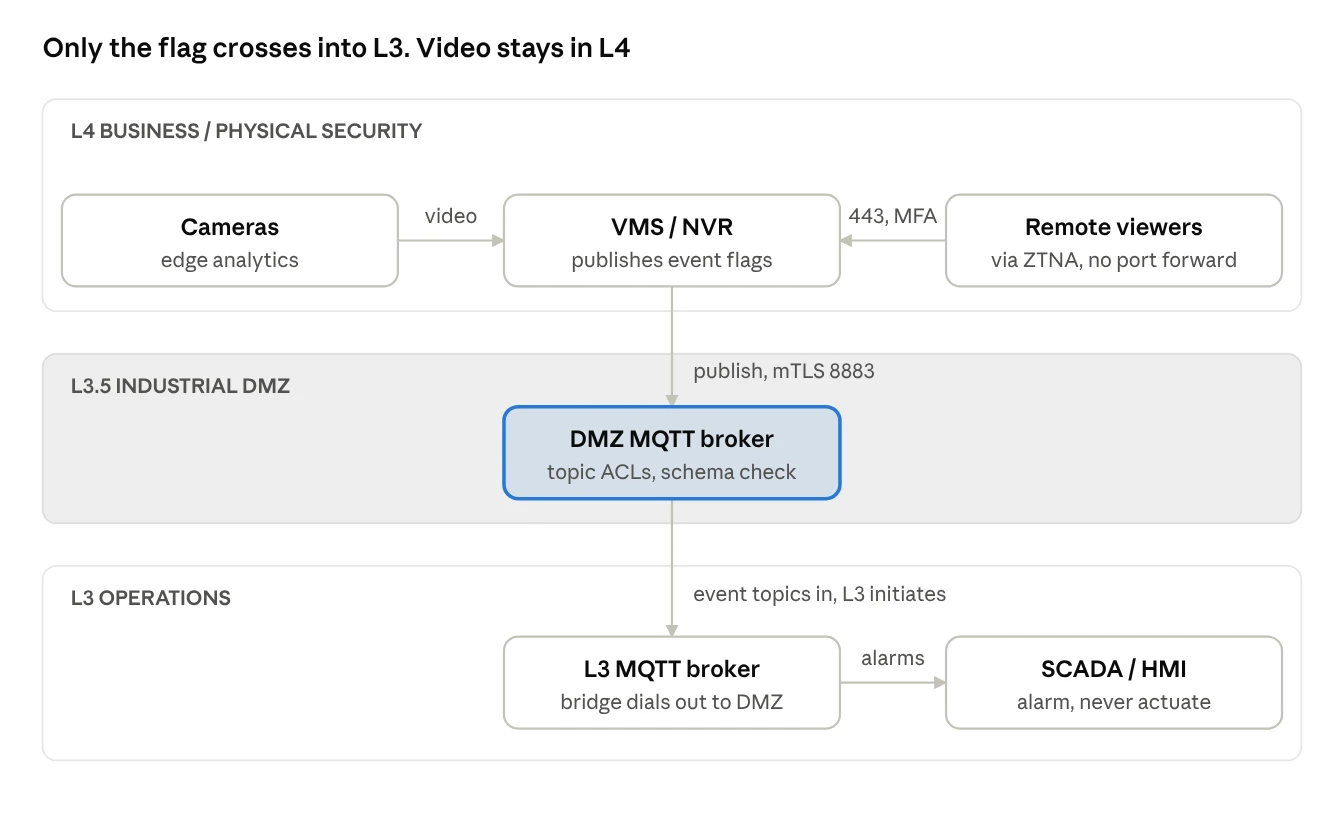
In this scenario, video never enters the control zone. Only the flag does. The cameras, the NVR and the VMS all sit on a physical security network on the business side at L4. Corporate security or a remote monitoring center watches them. Operations still wants the analytics, so the events ride the L3.5 broker down into SCADA.
 Open full-size diagram (new tab)
This is the cleanest design, and it's where I'd start any site that doesn't have a hard reason to keep video in OT.
Remote viewing. Port 443 lives entirely on the IT side. Remote users reach the VMS through the corporate ZTNA or VPN with MFA, never through a port forward. If the cameras are cloud managed, their outbound 443 goes to the vendor on an explicit allowlist, and that VLAN has no route toward the DMZ at all.
Flag path. The VMS analytics engine publishes events to the DMZ broker. The L3 broker bridges the event topics inward, and SCADA turns them into alarms on the operator's HMI.
Control room viewing. If an operator needs to see the image behind an alarm, give them a separate L4 viewing workstation in the control room, or a read-only stream relay hosted in the DMZ. Don't pull the VMS client onto an L3 HMI.
The risk to design around. Your flags now originate in the less trusted zone. If L4 is compromised, an attacker can publish fake intrusion events or suppress real ones. That's a nuisance and a blind spot, not a process upset, as long as you hold one rule: a camera flag raises an alarm, it never drives a control action. No interlocks, no automatic shutdowns from camera analytics. If a flag has to trip something, it needs a safety-rated detector behind it, not a camera.
On the SCADA side, alarm on stale data too. If the bridge drops or the heartbeat topic stops updating, operators should know the camera layer has gone quiet.
Scenario 2: Cameras split across L3 and L4
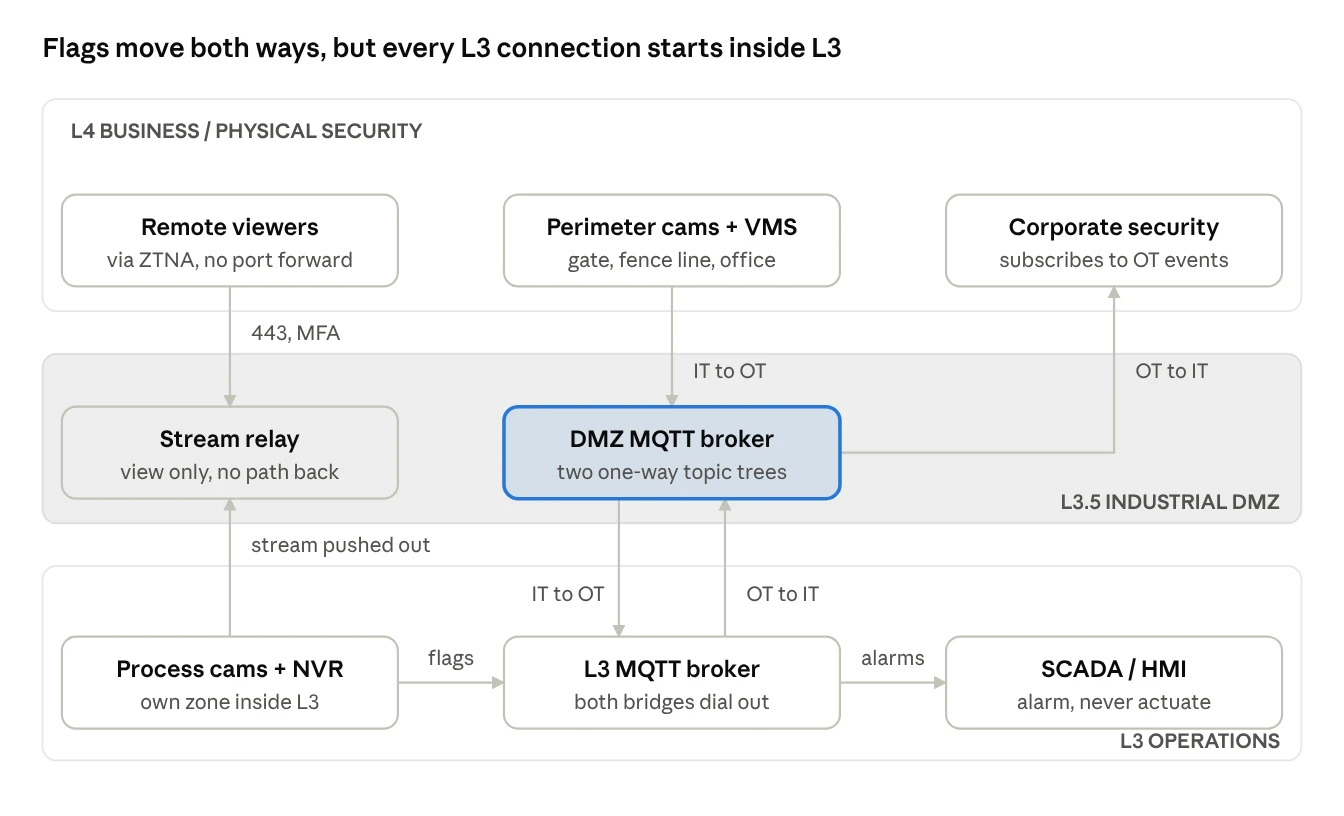
This is the scenario most midstream sites actually have, and it means the DMZ broker has to carry flags in both directions without either bridge becoming two-way. Perimeter, gate and office cameras sit at L4 under corporate security. Process area cameras watch flare stacks, tank farms, compressor bays and wellheads. Those sit at L3, record to a local NVR, and the control room monitors them directly. Each zone watches its own cameras, but each also needs some of the other zone's events.
 Open full-size diagram (new tab)
L3 cameras feeding L3 SCADA. These flags never leave the zone. The L3 analytics publish straight to the L3 broker. Even so, put the cameras in their own IEC 62443 zone inside L3, separated from the PLC and HMI networks by a conduit that only allows MQTT to the broker and video to the NVR. A camera is still a camera, even when it sits in L3.
L4 cameras feeding L3 SCADA. This is the same as Scenario 1. The L4 VMS publishes to the DMZ broker, and the L3 broker bridges the event topics inward.
L3 cameras feeding L4 security. Corporate security wants to know when someone walks into the tank farm. The L3 broker publishes that event tree outward over its own outbound bridge to the DMZ. L4 subscribers pull it from the DMZ broker. Nothing from L4 ever connects into L3.
So the DMZ broker holds two topic trees with opposite directions, for example stn01/it-to-ot/# and stn01/ot-to-it/#. Each tree is one way. The L3 bridge config is the enforcement point: it subscribes in on one tree and publishes out on the other, and the DMZ broker's ACLs reject any L4 client that tries to publish into the OT-bound tree under the wrong identity.
Remote viewing of L3 cameras. This is where port 443 sneaks back in. Someone will ask to view the flare camera from home, and the easy answer is federating the L4 VMS into the L3 NVR. Don't do that. A VMS federation link is a full management conduit across the boundary. Instead, have the L3 recorder push a stream outward to a relay in the DMZ, and let L4 users authenticate to that relay over 443 with MFA. The relay is view-only, and it has no path back to the cameras.
The risk to design around. You now run camera infrastructure inside the control zone, on the OT patch cadence, which is usually slower than IT's. That's acceptable only if the camera zone is isolated tightly enough that a compromised camera can reach the broker and the NVR and nothing else. Assume at least one camera will be compromised at some point, and design the zone so that's an annoyance, not an incident.
Controls mapped to IEC 62443
Both scenarios fall out of the same control set. Here's how it lines up against the seven foundational requirements in IEC 62443-3-3:
Swipe or scroll horizontally to read all columns.
| Foundational requirement | Port 443 / remote viewing | MQTT / L3.5 broker |
|---|---|---|
| FR1 Identification and authentication | MFA at the DMZ proxy or ZTNA broker; no default camera credentials | Unique client certificate per publisher, bridge and broker (mTLS) |
| FR2 Use control | View-only roles on the relay; admin access to cameras only from inside their zone | Topic ACLs per certificate; publish and subscribe rights split |
| FR3 System integrity | Firmware patched against CISA KEV; HTTP, UPnP and unused ports disabled | Schema validation and message size caps at the DMZ broker |
| FR4 Data confidentiality | Trusted certificates, not self-signed; TLS 1.2 or later | TLS on 8883 on every hop; no plaintext 1883 across a boundary |
| FR5 Restricted data flow | No inbound NAT; egress allowlist for cloud cameras; no VMS federation across zones | Connections always initiated from the more trusted side; one-way topic trees; optional unidirectional gateway |
| FR6 Timely response to events | IPS at the proxy, passive IDS on camera and L3 conduits; TLS metadata baselines; weekly 443 report to the SOC | Broker connection and ACL denial logs; stale-data alarm in SCADA |
| FR7 Resource availability | Camera VLAN rate limited so a flood can't starve OT links | Broker queue limits; SCADA alarms when the bridge or heartbeat drops |
The short version
Port 443 is a door, not a lock. Keep it off the cameras and put it on a proxy you control. Move flags, not video, across the OT boundary, and let MQTT do it through a broker at L3.5, where every connection starts from the trusted side. Whether your cameras land in L4 or straddle both zones, the design rules don't change. One-way topic trees, mTLS on every hop, and camera flags that alarm but never actuate.
If you're running cameras on an OT network today, start with one question: can anything on the internet reach a camera's web server on 443? If you aren't sure, that's your first project.
Thanks to Clint Rawlins, IIoT Systems Engineer at Twin Eagle Solutions, for his technical review and for the detail on VMS port usage beyond 443.
Sources & citation
- [1]Over 80,000 exploitable Hikvision cameras exposed online
BleepingComputer · August 2022
- [2]150,000 Verkada security cameras hacked to make a point
ThreatDown · March 2021
- [3]CVE-2021-36260 in the CISA KEV catalog
Cybersecurity and Infrastructure Security Agency
Cite this technical white paper
Shaw, Mick. "From Camera to SCADA Alarm: Securing Video Analytics in OT." With technical contributions from Clint Rawlins, IIoT Systems Engineer. Twin Eagle Solutions. Technical white paper, document dated November 12, 2026. https://www.twineaglesolutions.com/case-studies/camera-to-scada-security
Document date is provided for citation; publication date is not asserted.
Field questions
Frequently asked questions
How should camera analytics reach SCADA?
Send event flags, not video, through an MQTT broker in the L3.5 industrial DMZ. An L3 broker initiates an outbound TLS connection on 8883, subscribes only to the selected event tree, and republishes events locally for SCADA, the historian and the HMI.
Does HTTPS on port 443 make remote camera access safe?
Encryption protects the session, but it does not authorize the remote user or remove vulnerabilities in a camera's web server. The paper recommends no inbound NAT to cameras, NVRs or VMS servers; remote viewers use a DMZ proxy or ZTNA broker with MFA, supported by monitoring and logs.
What changes when cameras sit inside L3?
Place L3 cameras in their own IEC 62443 zone, with a conduit allowing MQTT to the broker and video to the NVR. For remote viewing, the L3 recorder pushes a stream outward to a view-only DMZ relay. Do not federate the L4 VMS into the L3 NVR.
Can a camera analytics flag trigger an automatic shutdown?
Not in these reference architectures. A camera flag raises an alarm; it never drives a control action, interlock or automatic shutdown. If a flag has to trip something, the paper calls for a safety-rated detector, not a camera.
How should SCADA detect a lost camera event feed?
Alarm on stale data. If the bridge drops or the heartbeat topic stops updating, operators should know that the camera layer has gone quiet. The control mapping also calls for broker queue limits and broker connection and ACL denial logs.
Continue the engineering conversation
- MQTT on a legacy SCADA network
A separate packet-level evaluation of MQTT traffic on existing field radios.
- Remote Video Services
Camera system design, installation and support.
- Industrial Communications
Network planning, field integration and ongoing operations.
Your next design review
Where does your camera network meet OT?
Bring your camera zones, VMS port map and SCADA event requirements. Talk with Twin Eagle about network planning and the boundaries your design needs to protect.